How friend groups work
VRChat gives you one status for all your friends. VRCPersona adds a separate status per friend group — so what you tell people can differ from group to group.
One status vs. one per group
VRChat status
Whatever you pick reaches every friend the same way. There's no way to tell just your close circle to come over.
VRCPersona group status
Stay orange on VRChat while your close group sees green. Every group can hold a different color at the same time.
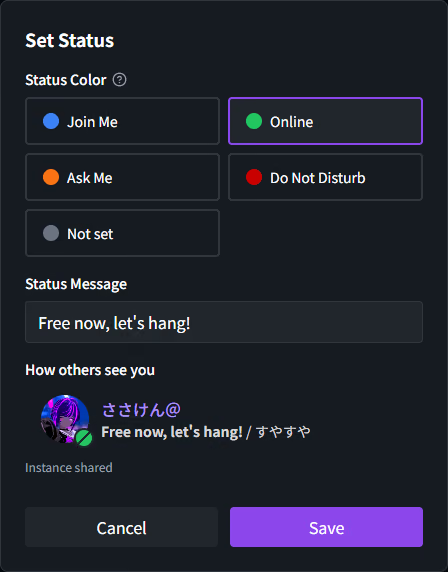
The four colors, and what they do
The color you pick also decides whether that group can see where you are. Blue and green share your instance; orange and red don't.
-
Join Me Shares instance
Shares your instance with the group, and invite requests from its members are accepted automatically.
-
Online Shares instance
Shares your instance with the group. Invite requests still wait for your approval.
-
Ask Me Not shared
VRCPersona doesn't share your instance.
-
Do Not Disturb Not shared
VRCPersona doesn't share your instance.
-
Not set Not shared
No group status at all — friends see only your VRChat status.
How others see it
In the friend list, your VRChat status and your VRCPersona status appear side by side — neither one overwrites the other. The settings screen includes a “How others see you” preview, so you can check before saving.
How it works
- Server groups only
- Group statuses live on the server and are visible only to that group's members. Local groups, which stay on your PC, don't support them.
- About 10 seconds to land
- Change a color or message and it reaches your friends' screens in roughly ten seconds.
- VRChat stays untouched
- VRCPersona never rewrites your VRChat status. How you appear inside VRChat is exactly as before.
- A short message
- Add up to 100 characters alongside the color. Lines you use often can be pulled back from your history.
Before you start
- Server groups require linking Discord and then VRChat. A local group can be converted to a server group at any time.
- The free plan allows up to three groups, with five members per server group. A license removes both limits.
- Even on orange, red, or no status, anything VRChat itself makes public stays visible as usual. What VRCPersona holds back is only what the app would share.
Try a status per group