Frequently Asked Questions
As of 2026-08-16, this FAQ reflects the implementation of version 1.0.0 of the app and of the server.
Usage
What is VRCPersona?
It's a desktop app for Windows that lets you organize your VRChat friends into friend groups.
Is it free to use?
Yes, it's free to use at its core.
On the free plan you can create up to 3 groups, with up to 5 members per server group, while local groups can have an unlimited number of members.
Purchasing a paid license (¥700 (tax included), one-time purchase on BOOTH) removes the limits on the number of groups and members, and unlocks license-only features such as the VR overlay.
I bought the license — how do I activate it?
What you type into the app is your BOOTH order number. There is no separate license key to enter.
- Buy the paid license on BOOTH.
- Link your Discord account from the sidebar in the app (linking Discord is required to manage your license).
- Open Settings and go to "License".
- Enter the order number shown in your BOOTH purchase history, then press "Activate".
Activation is tied to your Discord account. As long as you link the same Discord account, one order number works even if you have more than one VRChat account. Linking VRChat is not needed for activation itself (server groups and status sharing do additionally require VRChat account linking, to prevent impersonation).
Activation can be attempted up to 3 times per hour. After 5 incorrect order numbers, activation is locked, and getting it unlocked means reaching the developer via Discord. The Discord link is under Settings → "About VRCPersona".
Using "Remove Plan" does not delete your data. Entering the same order number again brings the paid features back.
Can I use it without VRChat running?
Yes. It retrieves your friend information through the VRChat API, so it works even when VRChat isn't running.
Does it work if I have two-factor authentication (2FA) enabled?
Yes. It supports both authenticator apps (TOTP) and codes sent by email (email OTP).
Which operating systems are supported?
Currently only Windows 10/11 (64-bit) is supported.
How do I update the app?
The app checks for updates automatically at launch and while running. When an update is available, you're notified inside the app and can download and apply it (with a restart) at the click of a button.
Is server integration required?
No. Core features such as the friend list, location display, notifications, local groups, and the local database all work without server integration.
Activating a license needs Discord linking; VRChat linking is not part of that step.
Server groups — sharing group status and instances — need VRChat linking on top of Discord.
What's the difference between local groups and server groups?
Local groups are stored only on your PC and can be used to organize friends and configure notifications. They don't require server integration, and the number of members is unlimited even on the free plan.
Server groups are stored on the server and enable online features such as group status and instance sharing.
You can convert a group between local and server at any time.
See How friend groups work for the details.
Can I use it in VR?
Yes. When you purchase a paid license, you can use the VR overlay, which keeps your friend groups displayed in VR space at all times, and the SteamVR dashboard, which lets you operate the app's screen with a laser pointer inside VR (SteamVR required).
Sending notifications to XSOverlay is available even on the free plan.
What kinds of notifications can I receive?
Beyond friends going online/offline, moving between worlds, and changing status, you can receive a wide range of notifications, including VRChat notifications (friend requests, invites, boops, and more), group-related events, joining and leaving instances, and earning badges.
There are three notification destinations — Windows notifications, Discord webhooks, and XSOverlay — and notification targets can be customized per group. You can also turn Windows notifications off only while XSOverlay is running.
Instance headcount change notifications, avatar change notifications, and the "all alone" notification are license-only features.
How do I get a Discord webhook URL?
-
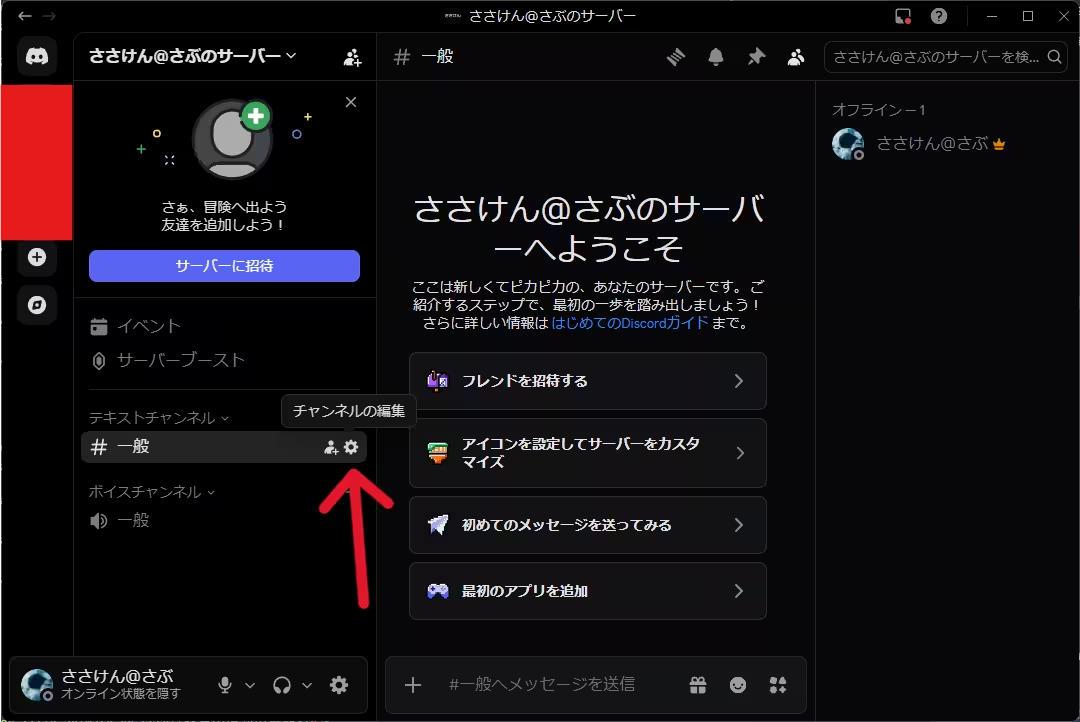
Click the settings icon (the gear) on the Discord channel where you want to receive notifications and open “Edit Channel.”
-
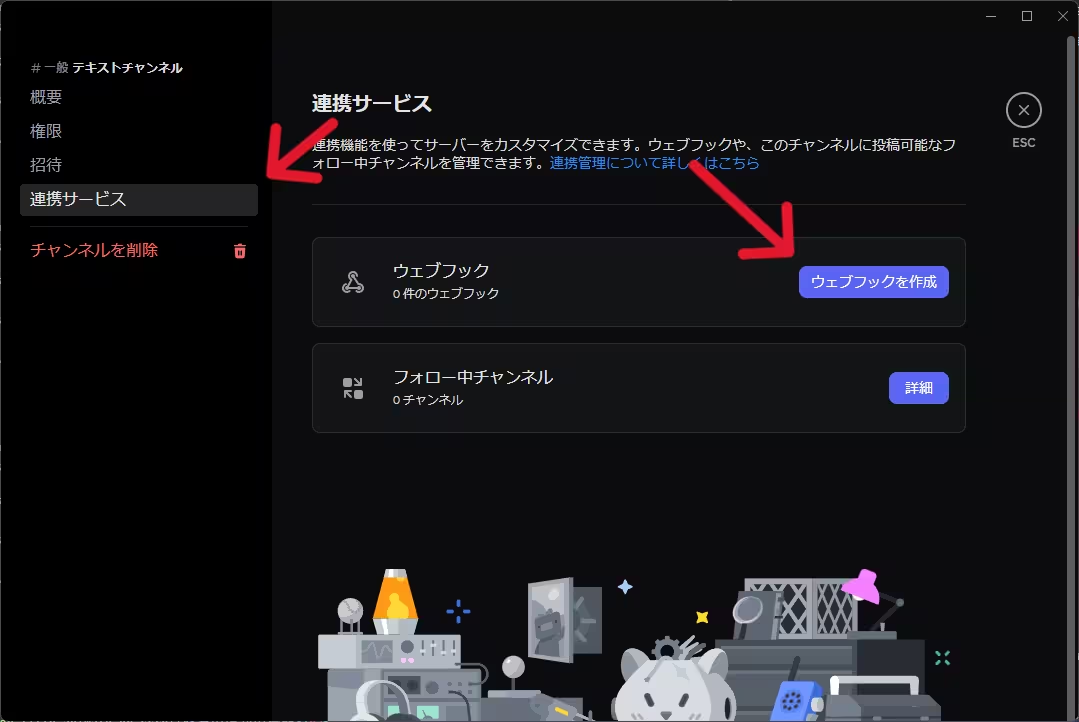
Select “Integrations” in the left menu and click “Create Webhook.”
-
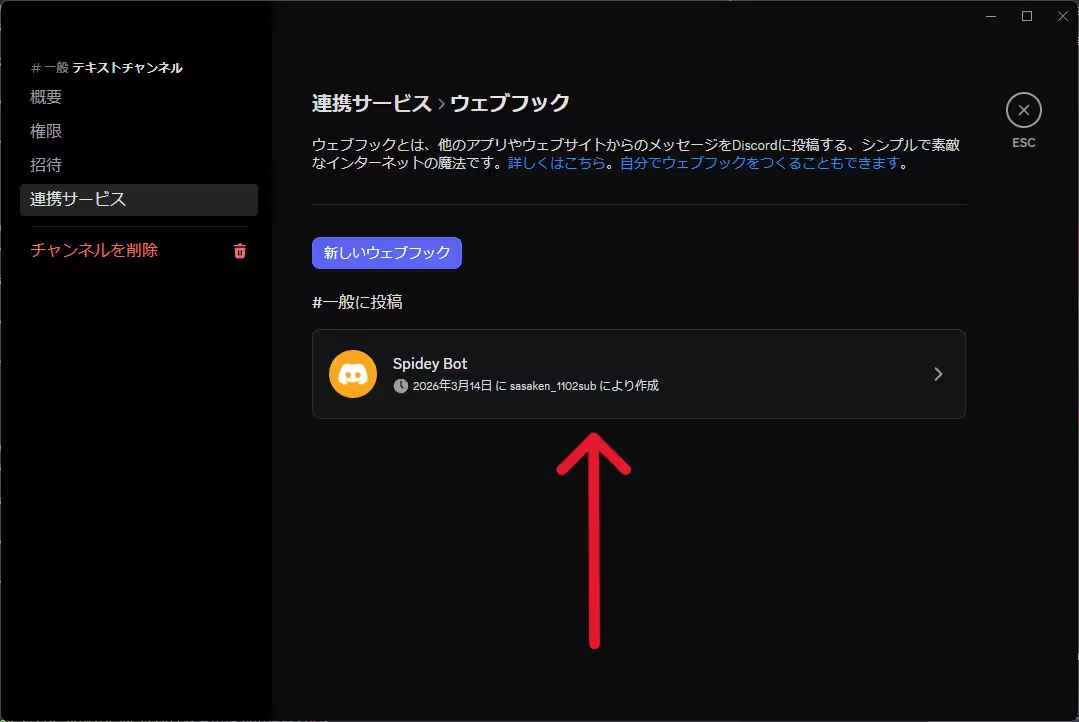
Click the webhook you created to open its details.
-
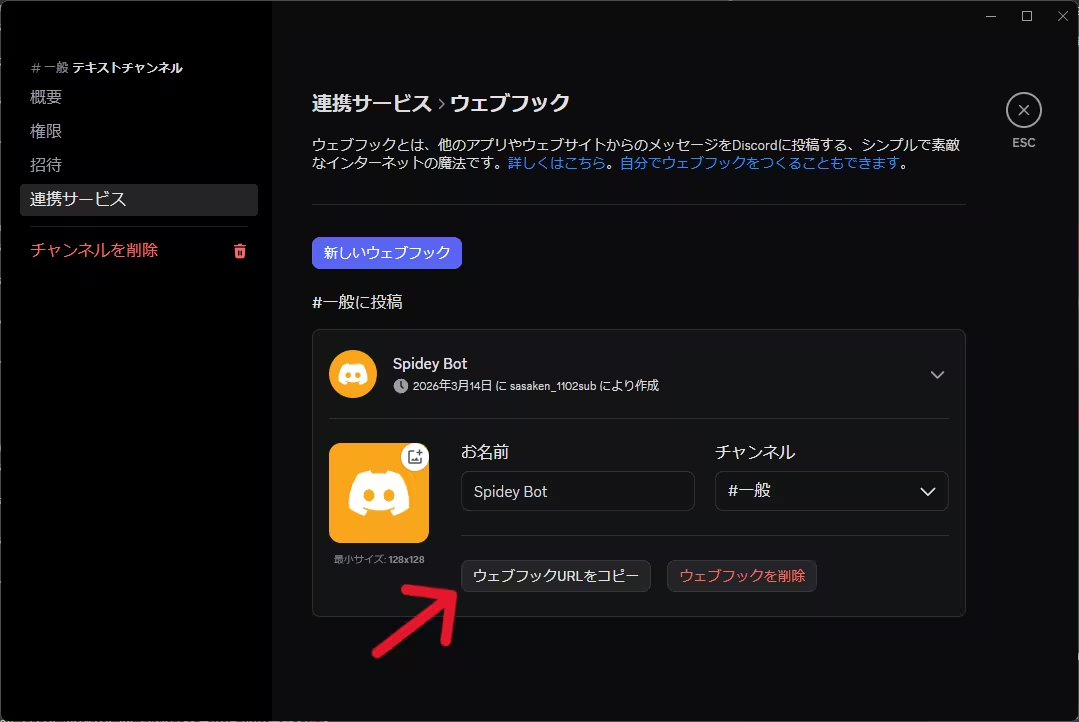
Click “Copy Webhook URL” and paste it into the VRCPersona settings screen.
Where does this app stand under VRChat's terms and guidelines?
VRCPersona is not an app approved by VRChat.
VRChat currently offers no approved integration method such as OAuth to individual developers, so this app — like other community-made tools — is provided from an unapproved position.
The app does not modify the game client or install any mods. It connects directly from your PC to the VRChat API and WebSocket (your VRChat credentials never pass through VRCPersona's server).
On top of that, only VRChat can judge whether this app complies with VRChat's Terms of Service, and we cannot assure you from the developer's side that there is no problem. Nor can we rule out that using it may affect your VRChat account.
What we can do is disclose as much as possible about what the app does and does not do. How credentials are handled is described here, and the scope of stored data in our Privacy Policy. Please review these and use the app at your own discretion.
Can I get a refund?
Because this is a digital product that unlocks paid features upon purchase, we do not accept cancellations or refunds for reasons attributable to the buyer.
We also generally do not offer refunds when some features become restricted or removed due to changes in VRChat's specifications, guidelines, or the like.
However, in cases where the law requires it — such as a serious defect in the app or the license authentication feature, or where the product significantly differs from its description — we will respond in accordance with the law.
Please try the free plan to confirm how it works before purchasing. For details, see the “Disclaimer” section of the Terms of Service.
Privacy & Security
Does VRCPersona use Discord to sign in to VRChat?
No. You sign in to VRChat directly with your VRChat account (two-factor authentication is supported).
Discord is never involved in VRChat authentication. Your VRChat credentials are never passed to Discord, and you never sign in to VRChat through Discord.
Discord linking is used only to identify your VRCPersona account for server groups and license management, and it is optional. If you only use local groups, you do not need to link Discord.
Why is token login recommended? Is logging in with email and password dangerous?
No — logging in with your email and password is not dangerous.
The email address and password you enter are used on the spot to log in to the VRChat API, and are stored neither on your PC nor on VRCPersona's server (only the authentication token and cookies obtained after login are stored). Either method is perfectly fine to use.
The reason we still recommend token login is simply that information you don't have to hand over is best not handed over at all. A password is often reused on other services, so if you can reduce how often you type it, that peace of mind is worth having.
On top of that, VRChat's authentication tokens are tied to the IP address they were issued to and cannot be used from a different IP. VRChat still assumes that any API interaction comes from the user's own device and IP, and as recently as February 2026 there were reports of sessions being rejected in environments where the IP changes from one connection to the next. In other words, even if a token leaked somewhere, it's a key that doesn't work outside your own connection.
That said, what a token can do through the VRChat API is exactly the same as with a password login, because either method ends with the app using the same authentication token. The advantage of token login is not that the app gets fewer permissions — it's that you never have to hand over your password, and that a leaked token can't be reused anywhere else.
You can invalidate a token at any time by logging out on the official VRChat website (this signs the app out as well). Note that because of the IP binding, a token can stop working when your IP changes — for example when you switch VPNs or reconnect your line. If that happens, just follow the steps shown on the app's login screen to get a new one.
- VRChat Creator Guidelines (updated 2025-04-15) — “If a user account is interacting with our API, we assume that the interaction comes from the user's device and IP.”
- VRChat Feedback — login failures where the IP changes between connections (reported 2026-02-28; marked “Tracked” by VRChat on 2026-03-11)
- Reply from VRChat's official account (2020-02-18) — explaining that tokens are tied to IP as a safeguard against token theft
Is my VRChat password stored?
The password itself is not stored.
After you log in, your authentication token and cookies are encrypted and stored on your PC for use in subsequent logins. The encryption key is managed by the Windows Credential Manager.
The source for how this storage and encryption works is published on GitHub — including what is stored where, and what this approach does not protect against.
In fact, if you use token login, there's no need to enter a password at all.
What's included in an error report?
Sending error reports is off by default (opt-in).
The information sent includes the type of error, the message, where it occurred, the app version, and OS information; your VRChat ID and your PC username are masked before sending.
Reports are stored linked to your account and are automatically deleted after 30 days.
You can toggle this feature at any time from the settings screen.
Where are records and charts stored?
Records and the numbers behind the charts stay on this PC. They are not sent to the VRCPersona server.
Only what happens after you turn the feature on is kept — time when the app was not running is not included.
When you share an image, your friends' names are hidden by default.
If you have been using VRCX, you can bring your existing records over.
What if I want to delete my data?
Local data is deleted if you check “Delete application data” when uninstalling.
If you uninstall without checking that box, data may remain in the app data folder, so please delete it individually from the settings screen or delete the app data folder manually.
Data on the server can be deleted at any time from “Delete Account” in the settings screen. Your account, server groups, statuses, consent records, and more are deleted, and error reports are anonymized and then automatically deleted after 30 days.
What is the collected data used for?
It is used solely to provide the app's features and keep it running reliably.
We do not sell it to third parties or use it for purposes unrelated to the app.
For details, please see the Privacy Policy.